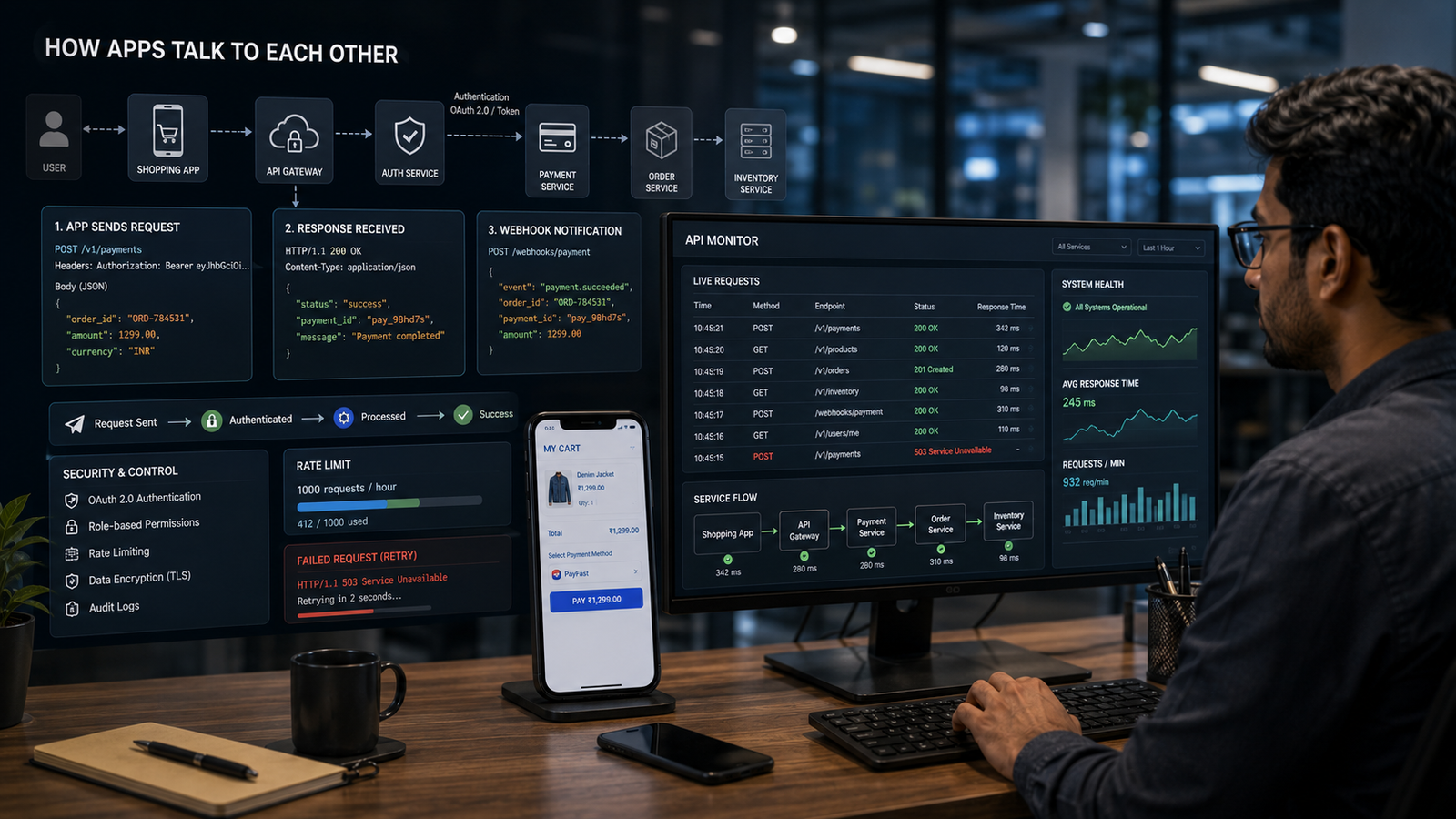
Apps feel like separate worlds. A messaging app, a cab booking app, a payment app and an email app each have their own design and purpose. Yet they constantly depend on each other. A ride app may open a map, a shopping app may call a payment gateway, a calendar app may send reminders to email, and a finance dashboard may pull bank, accounting and invoicing data into one screen. These interactions happen because apps are designed to talk in structured digital languages.
The Simple Meaning
Apps talk to each other by sending requests and receiving responses through agreed interfaces. The communication may happen through the internet, inside the same device, inside a company’s private network or between cloud services. The most familiar pattern is this: one app asks a server or another service for something, the service processes the request, and a response comes back. The user only sees the result. Behind the screen, the apps are exchanging instructions and data.
The Role of Servers
Most apps do not store and process everything on the phone itself. A large part of their work happens on servers. A server may hold user accounts, product lists, map tiles, payment records, messages or search results. When an app needs information, it contacts a server. If the server must interact with another service, it may use that service’s API. This chain can be short or long. One tap on a mobile screen can trigger several background calls before the app displays a simple answer.
Requests and Responses
The request-response model is the foundation of much app communication. A request contains the destination, the action, any required data and often an authentication token. The response contains the result. For example, a weather app may request the forecast for a location. A food app may request restaurant availability. A payment app may request confirmation of a transaction. The response may say success, failure, not found, not authorised or temporarily unavailable. These signals help the app decide what to show next.
HTTP and Common Methods
Many app communications use HTTP, the same broad protocol family that powers the web. HTTP methods give meaning to requests. A GET request usually retrieves data. A POST request usually sends data for processing. PUT or PATCH may update existing information. DELETE may remove a resource where permitted. Real systems can be more complex, but this shared vocabulary helps developers design predictable communication between apps, servers and services.
Data Formats: Why JSON Is Common
Apps also need a common way to package information. One widely used format is JSON, which represents data as structured key-value pairs. A response might include a user’s name, order number, payment status, delivery time and location coordinates in a format that software can read easily. The app then converts that data into human-friendly screens. The user sees cards, buttons and messages; the app sees structured fields.
Authentication and Permission
Apps cannot simply ask for anything from any system. Secure communication requires identity and permission. An app may send a token proving that the user has logged in. It may have permission to read profile data but not change payment settings. It may be allowed a limited number of requests per minute. This is why connected apps often ask for access permissions. The permission layer prevents one service from using another service beyond approved limits.
Webhooks and Background Updates
Not every app conversation begins with a user pressing a button. Sometimes one system needs to notify another system automatically. This is where webhooks are useful. A payment gateway can notify an e-commerce system when payment succeeds. A form tool can notify a CRM when a lead is submitted. A delivery system can notify a customer app when shipment status changes. Instead of constantly asking ‘has anything changed?’, one app can send an event when something important happens.
Why App Communication Fails
App communication can fail for many reasons. The internet connection may drop. A server may be overloaded. A token may expire. A request may be malformed. A third-party service may be down. An API may change without proper migration. Good apps handle these failures gracefully by retrying, showing clear messages, saving drafts or switching to offline mode where possible. Poorly designed apps make the failure look like random user error.
Final Takeaway
Apps talk to each other through structured digital conversations. Servers, APIs, HTTP requests, data formats, authentication and event notifications work together to create the smooth experiences users expect. When this communication is designed well, different services feel like one seamless system. When it is designed poorly, the user sees delays, errors and confusion. The hidden conversation between apps is therefore one of the most important layers of modern software.