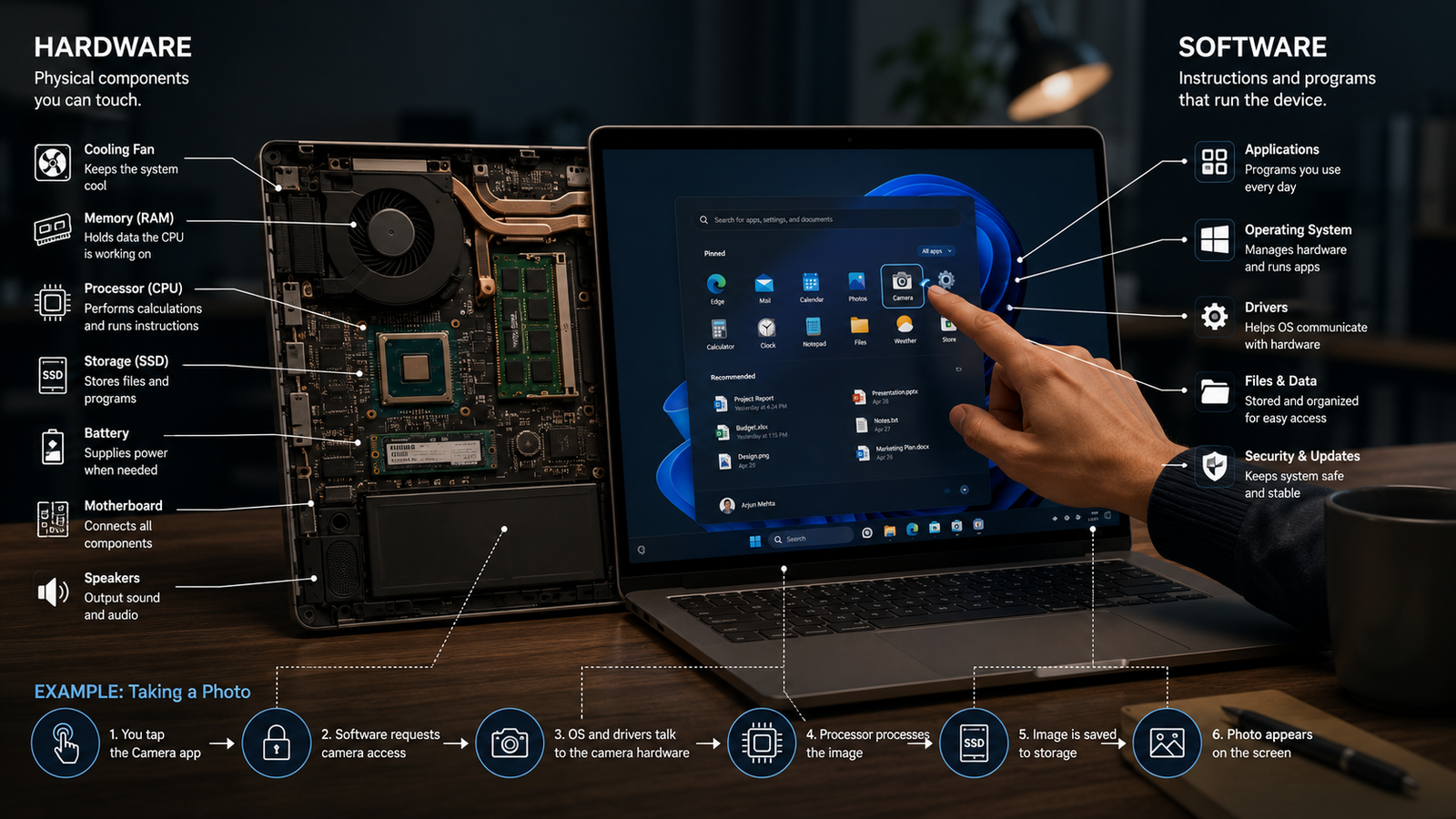
A smartphone can take photos, play music, make video calls, run banking apps and browse the internet. But what exactly makes all this possible? Some parts are physical: screen, camera, battery, processor, speaker and storage chip. Other parts are invisible: operating system, camera app, browser, security settings and code. The difference between hardware and software is one of the first ideas in computing, but it remains essential for understanding every digital device.
The Simple Meaning
Hardware is the physical part of a computer or digital device. It is what you can touch, hold, see or replace as a component. Software is the instruction layer that tells the hardware what to do. It includes operating systems, applications, drivers, utilities and code. Hardware without software is like a machine with no instructions. Software without hardware is like a plan with no machine to execute it. The two are different, but they depend on each other.
What Counts as Hardware
Hardware includes the processor that performs calculations, RAM that holds active data, storage that keeps files, the motherboard that connects components, the battery that supplies power, the screen that displays information and input devices such as keyboard, mouse, touchscreen, camera or microphone. In larger systems, hardware also includes servers, networking equipment, printers, sensors and data-centre machines. Hardware gives computing its physical capacity.
What Counts as Software
Software includes the operating system that manages the device, applications that users open, drivers that help hardware communicate, firmware that sits close to hardware and scripts or programs that perform specific tasks. A photo editor, accounting tool, game, browser, messaging app and antivirus system are all software. Software may be installed locally, accessed through the cloud or embedded deep inside a device. Its role is to organise logic into instructions the machine can execute.
How They Work Together
When you tap a camera icon, software interprets the touch, asks the operating system for camera access, uses drivers to communicate with the camera sensor, processes the image and stores the file. Hardware captures light and stores electrical signals. Software decides how to focus, process colour, compress the image and present the final photo. The user experiences one action, but the actual process is a partnership between physical components and coded instructions.
Operating Systems as the Bridge
An operating system is the bridge between hardware and applications. It manages memory, files, permissions, input, output, background processes and hardware resources. Without an operating system or equivalent control software, every application would need to know how to talk directly to every hardware component. The operating system simplifies this by offering common services. This is why apps can run on complex devices without individually managing every wire, chip or sensor.
Firmware and Drivers
Between hardware and high-level software sit firmware and drivers. Firmware is low-level software stored on hardware devices, helping them start and operate. Drivers are software components that allow the operating system to control specific hardware. For example, a printer driver helps a computer send print instructions correctly. A graphics driver helps the system use the graphics processor. These layers show that hardware and software are not always separated by a clean line; they often meet through specialised control code.
Everyday Buying Decisions
Understanding hardware and software helps in buying devices. A powerful processor and enough RAM can improve performance, but poor software optimisation can still make a device feel slow. A good camera sensor matters, but image-processing software can strongly influence final photo quality. Large storage is useful, but software updates and app design affect long-term usability. The best device is not only the one with the strongest hardware specifications; it is the one where hardware and software are well integrated.
Common Misconceptions
One misconception is that software is less real because it cannot be touched. In practice, software can shape business operations, communication, privacy and security more deeply than hardware. Another misconception is that better hardware automatically solves every problem. Many issues are caused by outdated software, bugs, malware, poor configuration or lack of updates. A third misconception is that hardware and software can be judged separately. In modern systems, performance depends on how well both layers work together.
Final Takeaway
Hardware is the body of a computing device; software is the instruction system that gives it purpose. Hardware provides physical ability, while software directs that ability into meaningful tasks. Every digital action, from opening a file to sending a message, requires both layers. Once this distinction is clear, many other technology concepts become easier to understand: memory, processors, operating systems, apps, cloud systems, cybersecurity and the entire architecture of modern computing.